Paid product · Windows · Offline
The plan lives in a spreadsheet
beside the ERP.
Every plant I have worked in runs the same routine: export the open orders, filter the new ones, paste them under last week's, push and pull the dates by hand, check the shortages, then type it all back in. It takes a morning, it is out of date by the afternoon, and it lives with one person.
These two tools replace that routine. They are not a planning suite and they do not want to be your ERP. They do the one job the spreadsheet was doing, and they hand the answer back in the same file your ERP already exports.
The board
Production Scheduler
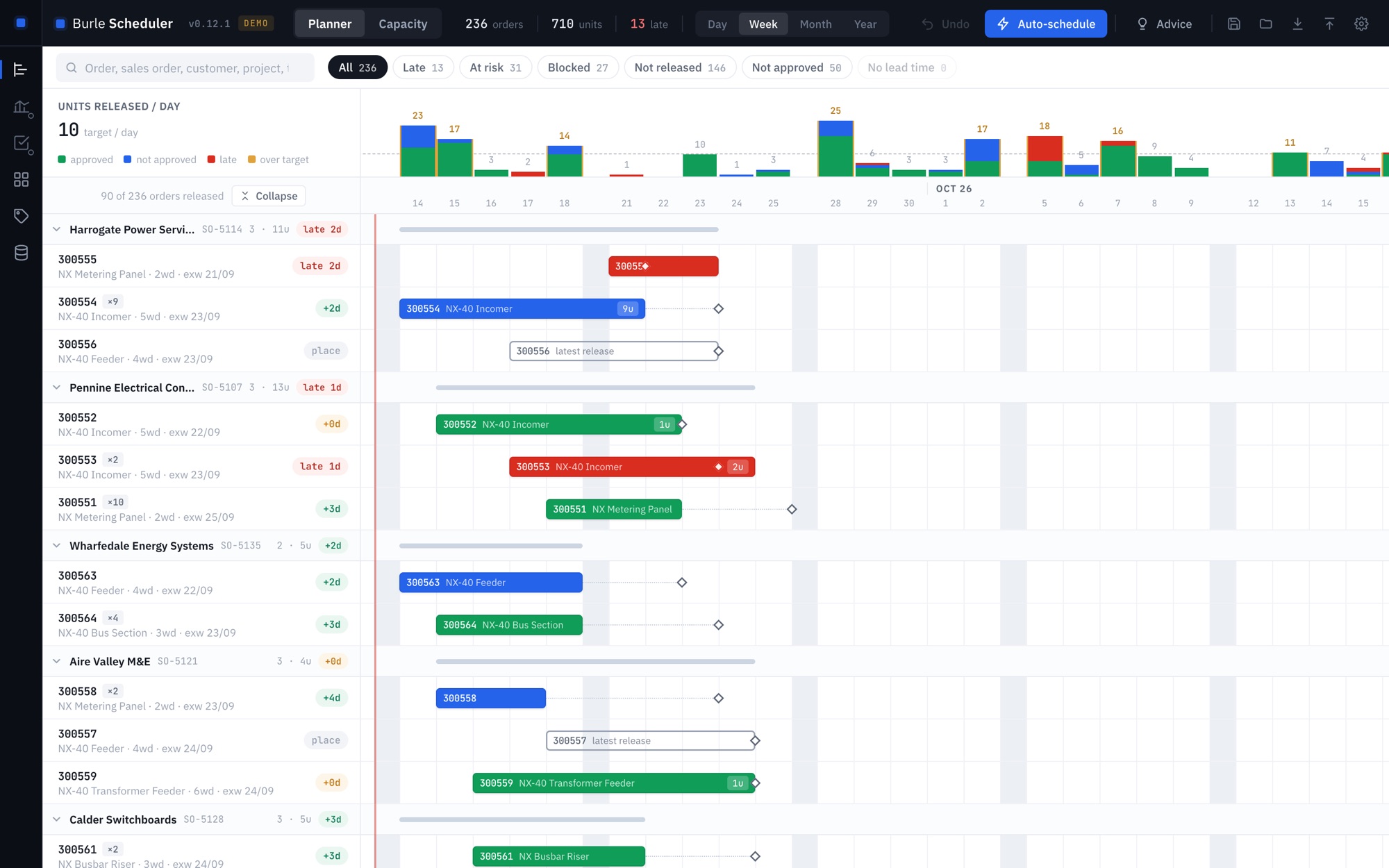
One row per order, time running to the right, and the dates you used to retype are bars you drag. Orders on the same sales order move together. A histogram across the top shows the units released each day against your target, so an overloaded week is something you see rather than something you find out about.
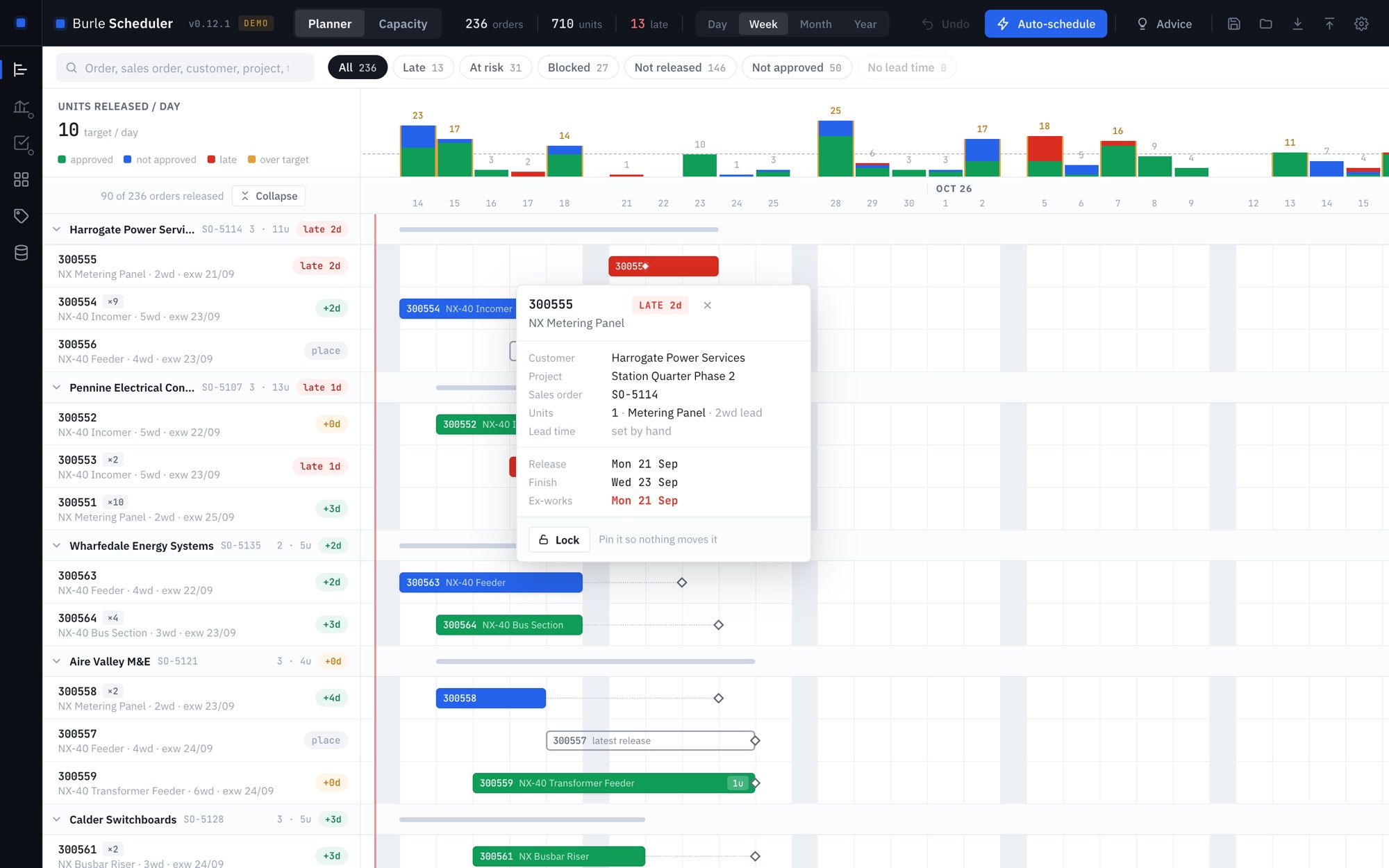
- Ex-works is the hard date. Drag an order past the point where it can still make its date and it goes red, with the number of days it is short.
- Auto-schedule proposes a levelled plan under your own rules: the daily target, a safety buffer, a frozen window, whether to allow overtime, whether to keep sales orders together, whether unapproved or shortage-blocked work is scheduled at all. Hard-coded policy is what makes a tool useless at the second company, so none of it is hard-coded.
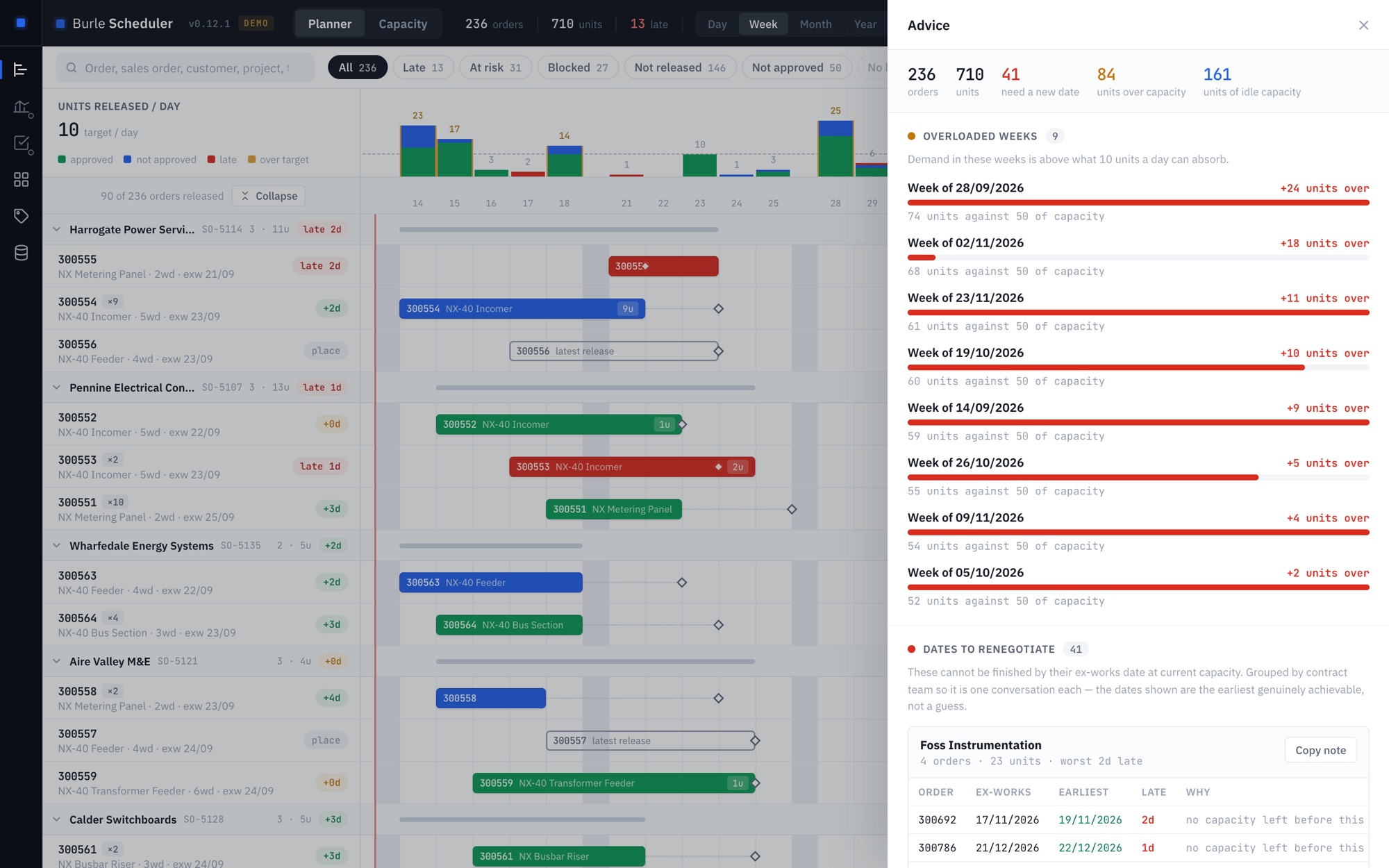
- Advice re-runs the plan with capacity as a hard limit. Anything still late genuinely cannot be made, and the date it gives you is the earliest achievable one, grouped by customer, with a paste-ready note for the conversation you now have to have.
- The round trip. Import the export, export it back in the same shape with only the dates rewritten, plus a sheet listing exactly what moved and why.
- A whole order book, not a sample. Tested on a generated 60,000-order export with more than 8,000 product codes: the board redraws in under a second and auto-schedule takes seconds, not minutes. Product types with no lead time are listed the moment the file is in, the ones on the most orders first, with a suggested match where a similar type already has one, so you fill in the few that matter instead of meeting them one at a time.
The numbers behind it
Capacity Generator
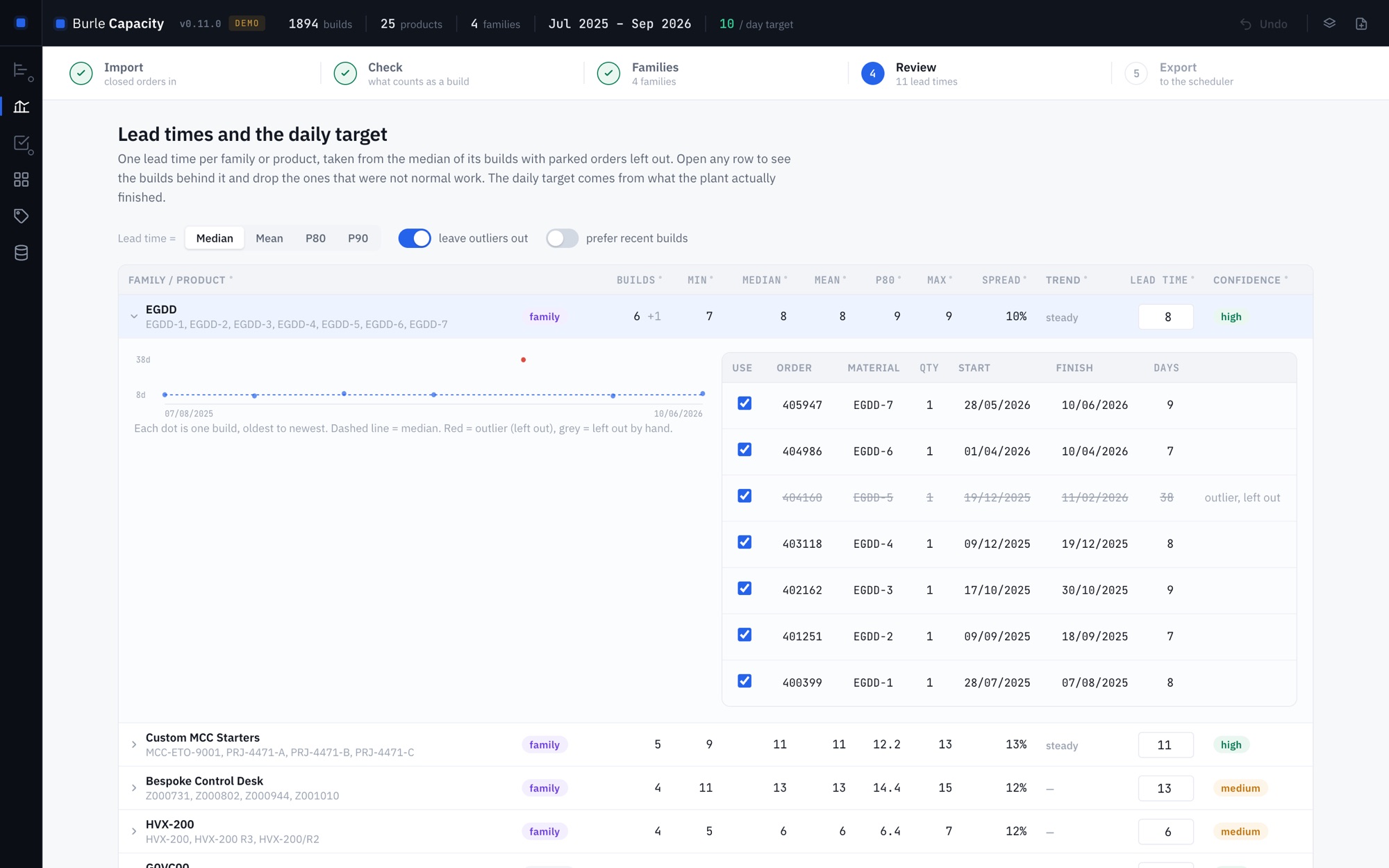
A scheduler is only as honest as its lead times, and most lead-time tables are somebody's guess from years ago. This one works them out from what your plant actually did: import a year of closed production orders and it reads the real start and finish dates.
- A lead time per product, from the median of its builds, with the parked and abandoned orders spotted and left out, because a job that sat waiting on a part for six weeks is not a lead time.
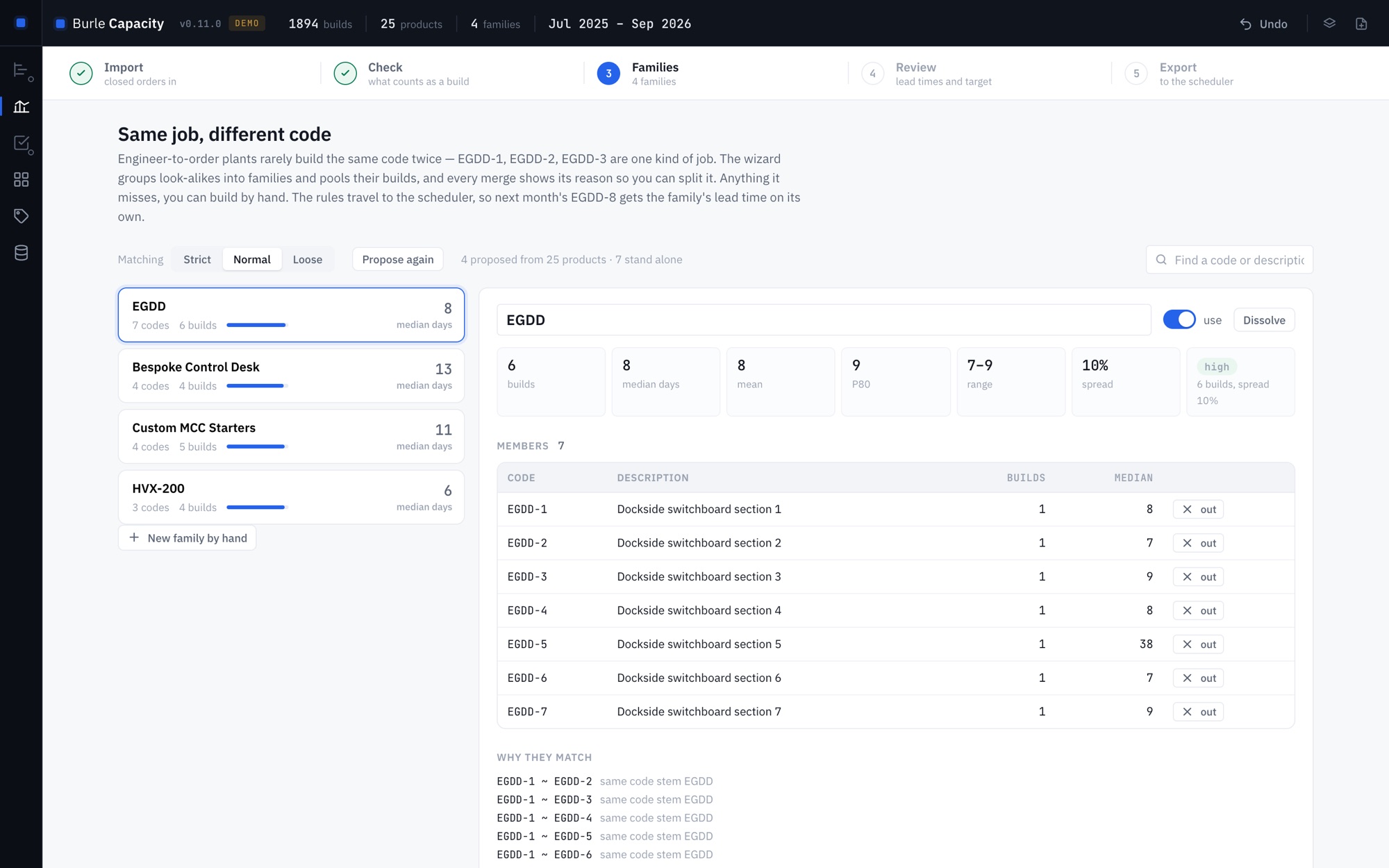
- Engineer-to-order work too. If you never build the same code twice, the tool groups the codes that are the same job (a shared stem, a revision, or simply descriptions that say the same thing) and pools their builds. Every grouping shows its reason and you can split it. The rules travel with the answer, so next month's variant picks up its family's lead time without anyone editing a table.
- A daily target from what came off the line, offered two ways: the plain average, and the pace the plant proved it can sustain.
- Every number shows its working. Open any row and you get the individual builds, their dates, and the ones that were left out, plus an Excel report with all of it, so the figure survives being questioned.
closed orders → Capacity Generator → lead times + daily target
→ Production Scheduler → dates back into your ERP file
Each tool works on its own. Install both and they find each other: a strip down the left of the window lists what you have, and the generator hands its figures straight to the scheduler, which shows you what would change before it applies anything. Nothing travels over a network to do it.
What IT usually asks
No. It is a single file. Copy it to a folder, a network drive or a USB stick and run it. No installer, no admin rights, nothing written to the registry.
No. The usual way to put a modern interface in a desktop app is a small web server on localhost. This does not do that: nothing binds a socket, so there is nothing to appear in a port scan and nothing to whitelist.
Nowhere. The app makes no network requests of any kind, and you can verify that rather than take my word for it. Your schedule is a file you choose, on a drive you choose. There is no telemetry, no licence check and no account.
Then you do not need the .exe. Both tools also build as one self-contained HTML file that opens in Edge from a network drive: same app, nothing to install, nothing to approve.
How it is sold
This is a paid product, and there is no download button on this page on purpose. It gets fitted to the file your ERP actually exports (your column names, your working week, your shutdowns, your scheduling rules), and that is a conversation, not a download. It is a fixed price agreed before any work starts, and the tool is yours to keep and to run offline forever, with no per-seat licence and nothing that expires.
If you want to see it move before anything else happens, ask and I will walk you through it on a call with an invented order book, or with your own export if you would rather. The free tools are the same engineering if you want to judge the work first, and the Skills Matrix source is public so you can read it.
Get in touch
Tell me what your Monday
morning looks like.
If the export you fight with every week sounds like the one described above, say so. The quickest way to know whether this fits is to send me the columns and let me tell you honestly.
rodrigo@burlesystems.co.uk